#How it works
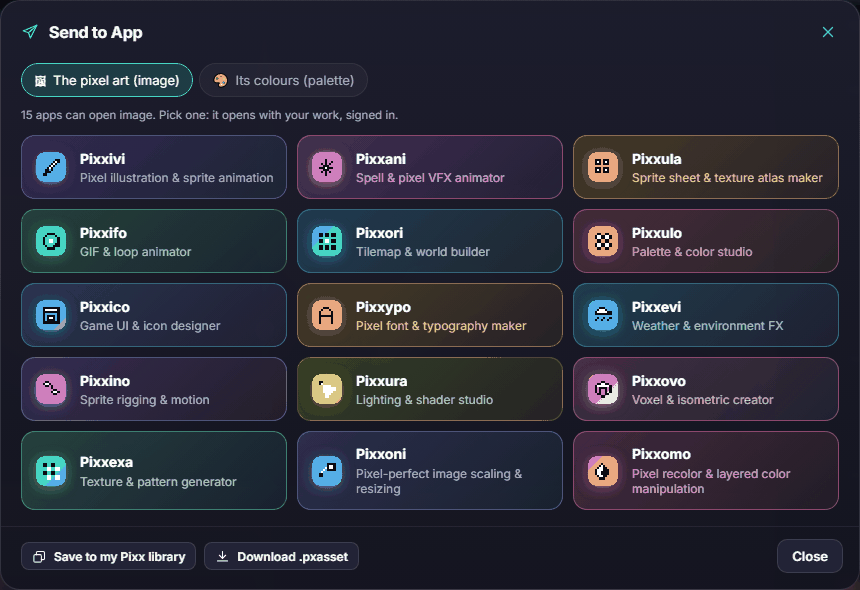
Every Pixx app has a Send to App button at the top. It packs up what you made, saves a copy in your Library, and opens the app you pick with your work already loaded, signed in. The app you came from keeps your project exactly as it was.
There are seven kinds of item you can send:
| Kind | What it carries |
|---|---|
| Image | One picture, often with its colours |
| Animation frames | A sequence of frames with their timing |
| Sprite sheet | All frames laid out on one sheet, with the grid size |
| Palette | A set of colours |
| Sound | A sound effect or a music loop (WAV), with its loop points |
| Dialogue | A conversation: portraits, lines, choices and voice blips |
| Game pack | A bundle of many items, ready to export to a game engine |
#How-tos
#How to send your work to another app
- Click Send to App at the top of the app.
- If the app can send more than one kind of thing, pick what to send, for example the animation or just its palette.
- Click the app you want in the grid. Only apps that can open that kind of item are shown.
- The other app opens with your work loaded.
#How to keep something for later without opening another app
- Click Send to App.
- Click Save to my Pixx library at the bottom of the window.
It's now in your Library, ready to open in any app that accepts it. See Cloud projects and your Library.
#How to open something another app sent
- Click Library at the top of the app you want to use.
- Click the item.
#What each app sends and opens
| App | Sends | Opens |
|---|---|---|
| Pixxivi | Animation, current frame (image), sprite sheet, palette | Animation, image, sprite sheet, palette |
| Pixxani | Animation, sprite sheet, palette | Image, sprite sheet, palette |
| Pixxato | The pixel art (image), its palette | Image, animation (first frame), palette |
| Pixxula | Frames, the packed sheet (image), sprite sheet | Animation, image, sprite sheet |
| Pixxifo | Animation, sprite sheet | Animation, sprite sheet, image |
| Pixxori | Map image, tileset (sprite sheet), palette | Image, sprite sheet, palette |
| Pixxulo | Palette, swatch strip (image) | Palette, image, animation, sprite sheet (to pull colours from) |
| Pixxava | Character image, animation, sprite sheets, palette | Palette, sprite sheet |
| Pixxico | UI piece (image), its states (sprite sheet), theme palette | Image, palette |
| Pixxypo | Text image, animated text, glyph sheet, palette | Sprite sheet, image, palette |
| Pixxevi | The loop (animation), sprite sheet, palette | Palette, image |
| Pixxino | Baked clip (animation), pose (image), sprite sheet | Image, sprite sheet |
| Pixxura | Lit frame (image), animation, palette | Image, animation, sprite sheet, palette |
| Pixxovo | Turntable (animation), view (image), directions (sprite sheet), palette | Palette, image |
| Pixxexa | Tile (image), animation, variants (sprite sheet), palette | Image, palette |
| Pixxibu | Sound | Sound |
| Pixxoni | The scaled result, as the same kind it came in as | Image, animation, sprite sheet |
| Pixxomo | The recoloured result, as the same kind it came in as, plus its palette | Image, animation, sprite sheet, palette |
| Pixxeta | Animation or sprite sheet with its hitboxes, pivots and events | Animation, sprite sheet, image |
| Pixxizi | Game pack | Everything: animation, image, sprite sheet, palette, sound, dialogue, game pack |
| Pixxkit | Store and marketing art (image, animated teaser) | Image, animation, sprite sheet, palette, game pack |
| Pixxune | Music loop (sound, with loop points) | Sound |
| Pixxoku | The cleaned-up result, as the same kind it came in as, plus its palette | Image, animation, sprite sheet, palette |
| Pixxado | The lit and shadowed result, plus shadow sheets | Image, animation, sprite sheet, palette |
| Pixxara | Dialogue, talking-portrait animation and sprite sheet | Image, animation, sprite sheet, palette, sound, dialogue |
#Popular hand-offs
- Draw, then pack: Pixxivi → Animation → Pixxula to build a sprite sheet for your game.
- Photo to sprite: Pixxato → Image → Pixxivi to clean it up by hand.
- Make a GIF: any animation → Pixxifo to export a looping GIF.
- Recolour a character: Pixxava → Sprite sheet → Pixxomo for colour variants.
- Share a palette everywhere: Pixxulo → Palette → any app that opens palettes.
- Scale it up crisply: any image or sheet → Pixxoni for pixel-perfect 2×, 3× or 4×.
#Troubleshooting
- If an app is missing from the grid, it can't open the kind of item you picked. Try another kind, for example a sprite sheet instead of an animation.
- If the other app opens but your work isn't there, make sure you're signed in on both, then open it from that app's Library.
- If Send to App asks you to sign in, use Download .pxasset instead, or sign in first.