#The plans
All plans are billed monthly in US dollars and renew until you cancel.
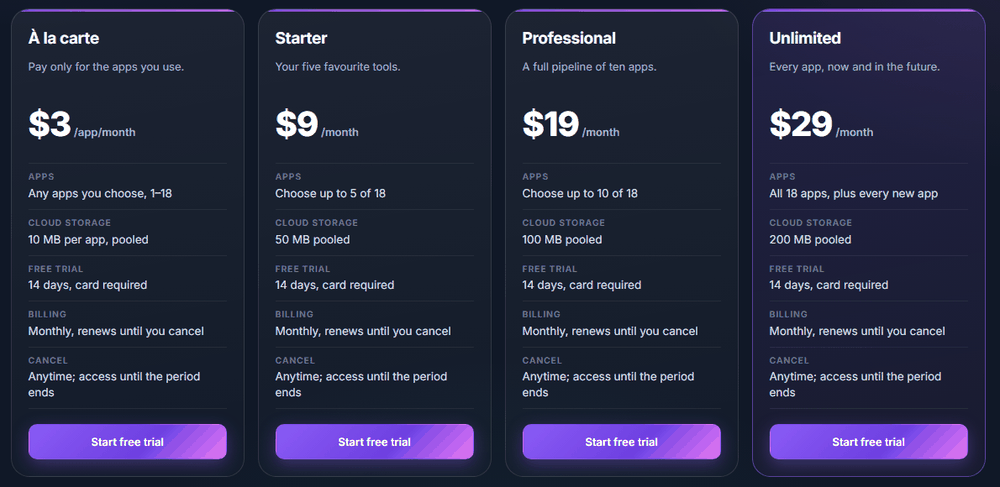
| Plan | Price | Apps | Cloud storage |
|---|---|---|---|
| À la carte | $3 per app, per month | Any apps you choose (1 to 25) | 10 MB per app, pooled |
| Starter | $9 per month | Any 5 apps | 50 MB |
| Professional | $19 per month | Any 10 apps | 100 MB |
| Unlimited | $29 per month | All 25 apps, plus every new app | 200 MB |
À la carte is great for one or two apps. Once you want three or more, a bundle is usually the better deal; the Pricing page shows the comparison as you pick.
Sales tax is added at checkout where it applies, based on your billing address.
#The 14-day free trial
- Every plan starts with a 14-day free trial, once per person.
- A payment card is needed to start it. Nothing is charged until the trial ends.
- We email you a reminder before the trial ends.
- Cancel before the trial ends and you pay nothing.
- After the trial, your plan renews every month at the price shown until you cancel.
#How-tos
#How to choose a plan and start your trial
- Click Pricing in the menu on pixxsuite.com.
- Click Start free trial on the plan you want.
- Pick your apps. Use the search box or the group filters; the counter shows how many slots are left. Unlimited skips this step.
- Sign in or create your account if you haven't yet.
- On Review your order, check your apps, the monthly price, and your trial start and end dates.
- Tick the box to agree to the recurring billing and continue.
- Enter your card in the secure checkout window. Your apps unlock as soon as the payment service confirms.
#How to use a promo code
- On Review your order, type the code in the Have a code? box and click Apply.
- The discount shows right away, along with how long it lasts.
- Continue to checkout as usual.
#How to add or swap apps
- Go to Account → My Plan.
- Click Edit apps.
- Pick the apps you want. Swaps within your plan's limit take effect immediately.
- On À la carte, adding an app shows the extra charge before you confirm.
#How to change your plan
- Go to Account → My Plan and click Change plan. You can also click Switch on another plan on the Pricing page.
- Choose the new plan and apps. You'll see exactly what changes and what it costs before you confirm.
- Upgrades take effect right away, with a prorated charge for the rest of the month.
- Downgrades take effect at your next renewal; you keep your current apps until then.
#How to cancel
- Go to Account → My Plan.
- Click Cancel trial or Cancel plan and confirm.
- You keep access until the end of the period you paid for (or the end of your trial), and you won't be charged again.
Changed your mind? Click Reactivate in My Plan before that date.
#How to get a refund
You can get a full refund within 48 hours of your first charge, once per account.
- Go to Account → My Plan.
- While you're within the window, you'll see Cancel and refund, with the amount and the deadline.
- Click it and confirm. The charge is refunded, your plan ends straight away and the apps lock.
Monthly renewals after the first charge aren't refundable. You can cancel any time to stop future charges.
#How to update your card or see invoices
- Go to Account → My Plan and click Manage billing.
- On the secure billing page you can change your card, download invoices and receipts, or cancel.
#Storage
Your plan's storage is shared by all your cloud projects and Library items, from every app. The storage meter in My Plan shows how much you've used, and we email you at 80%, 95% and 100%.
If you go over (for example after switching to a smaller plan), everything stays viewable, downloadable and deletable, but new cloud saves pause until you're back under the limit.
#Failed payments
If a renewal payment fails, the payment service retries automatically and we email you. Your apps keep working for a few days while it retries. If it still can't be paid, the apps lock until the payment goes through. Update your card in Manage billing and they unlock again.
#When a plan ends
- The apps lock, but your account stays.
- Your cloud work stays viewable and downloadable for 30 days. We email you the exact date before the cloud copies are deleted.
- Subscribe again before that date and everything is kept.
- Work saved in your own browser is yours and stays on that device.
#Troubleshooting
- If checkout finishes but an app still shows the lock screen, wait a few seconds and refresh. Your payment is confirmed directly with the payment service before apps unlock.
- If you don't see Cancel and refund, the 48 hours have passed, nothing has been charged yet (you're still in your trial), or the account already used its refund.
- If a code is rejected, it may have expired, reached its limit, be for new customers only, or not apply to the plan you picked.
- If you were charged tax you didn't expect, tax follows the billing address in your payment details. Update it in Manage billing.